Client case study · Website, booking and admin
Therapiezentrum PhysioHome: admin area and website
A practice platform with a website, online booking and an admin area that brings together requests from every form.
What did Datafalke build for PhysioHome?
Datafalke built a practice platform for Therapiezentrum PhysioHome in Gelsenkirchen, Germany: the website physiohome.eu, online booking for the practice’s emFieldPro service and an admin area where requests and bookings come together. Website, booking and admin area are one application with a shared database.
- Requests: contact, home-visit, care-home and booking requests land in one list with type and status, and replies go out straight from it.
- Online booking: emFieldPro appointments in three steps, only in open 20-minute slots and without double bookings.
- Admin area: cancel appointments, block times, maintain job ads and the newsletter; a log records sign-ins and changes.
- Website: pages on services, conditions and places in Gelsenkirchen, Gladbeck and nearby towns, plus a guide section.
- For AI assistants: llms.txt, llms-full.txt and Markdown versions of the pages; structured data describes the practice, its services and booking.
- pages in the sitemap of physiohome.eu
- 600
- API routes
- 31
- data models
- 9
- test cases in the code
- 681
Counted in the source code on November 23, 2026, code as of November 20, 2026.
Therapiezentrum PhysioHome · counted live on November 22, 2026
What does the platform look like?
Requests from every form and all online bookings arrive in PhysioHome’s admin area, where the practice can reply, cancel an appointment or edit a job ad. To keep real data out of view, all screens show invented test data from a local installation, names and counts included. The interface is in German.
Requests in one place
The contact, home-visit, care-home, booking and newsletter forms feed one list showing type, status and time received, with search and filters.
Search, filters by type and status, 20 requests per page, CSV export
Admin area · Requests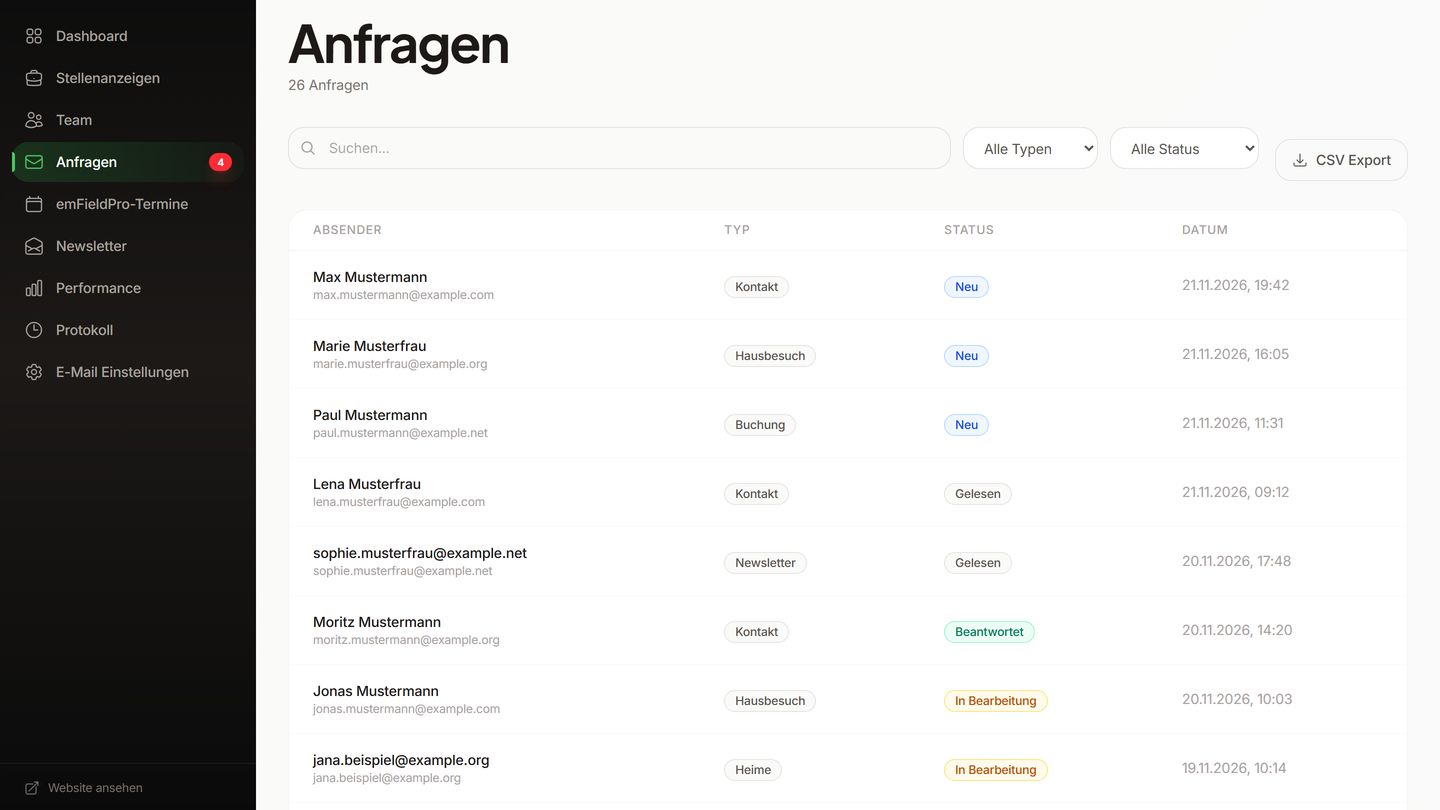
- The sidebar counts unread requests, and opening a new request marks it “Gelesen” (read).
- Each request carries the type of its form, and the filters can show a single type or status.
- The list can be exported as a CSV file.
- Five statuses track each request: “Neu,” “Gelesen,” “In Bearbeitung,” “Beantwortet” and “Weitergeleitet” (new to forwarded).
One request in detail
Each request opens with the data from its form, on a smartphone too, and “Vorherige” and “Nächste” (previous, next) step through the list.
Form data per form, internal notes, previous and next request
Admin area · Request on a smartphone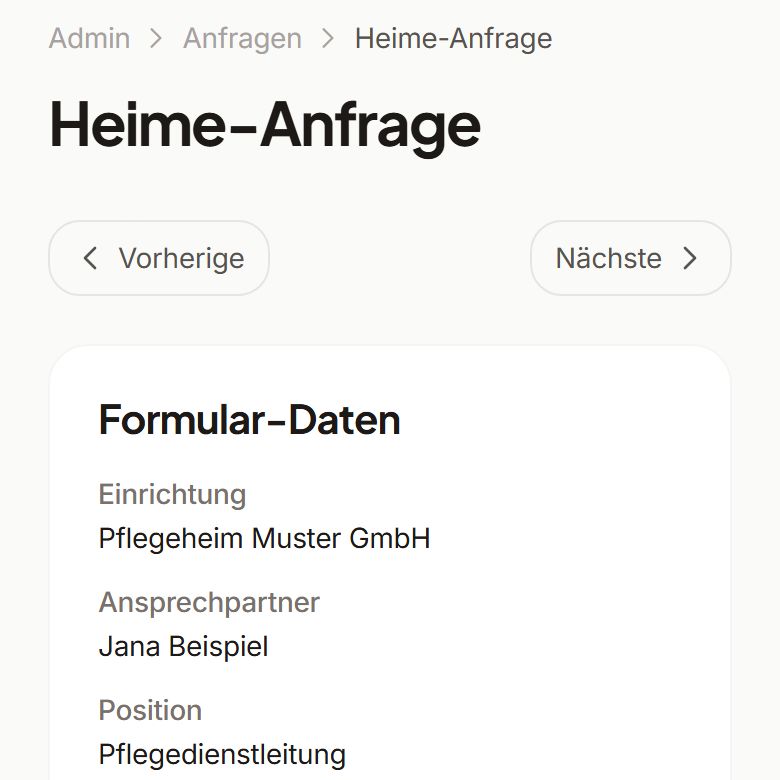
View with test data, captured on Nov 21, 2026 Replies from the system
Replies go out by email from the admin area, optionally from a template; the reply is saved with the request, which is marked “Beantwortet” (replied).
Sent emails on the request, status changed by hand, deletion only after confirmation
Admin area · Replying to a request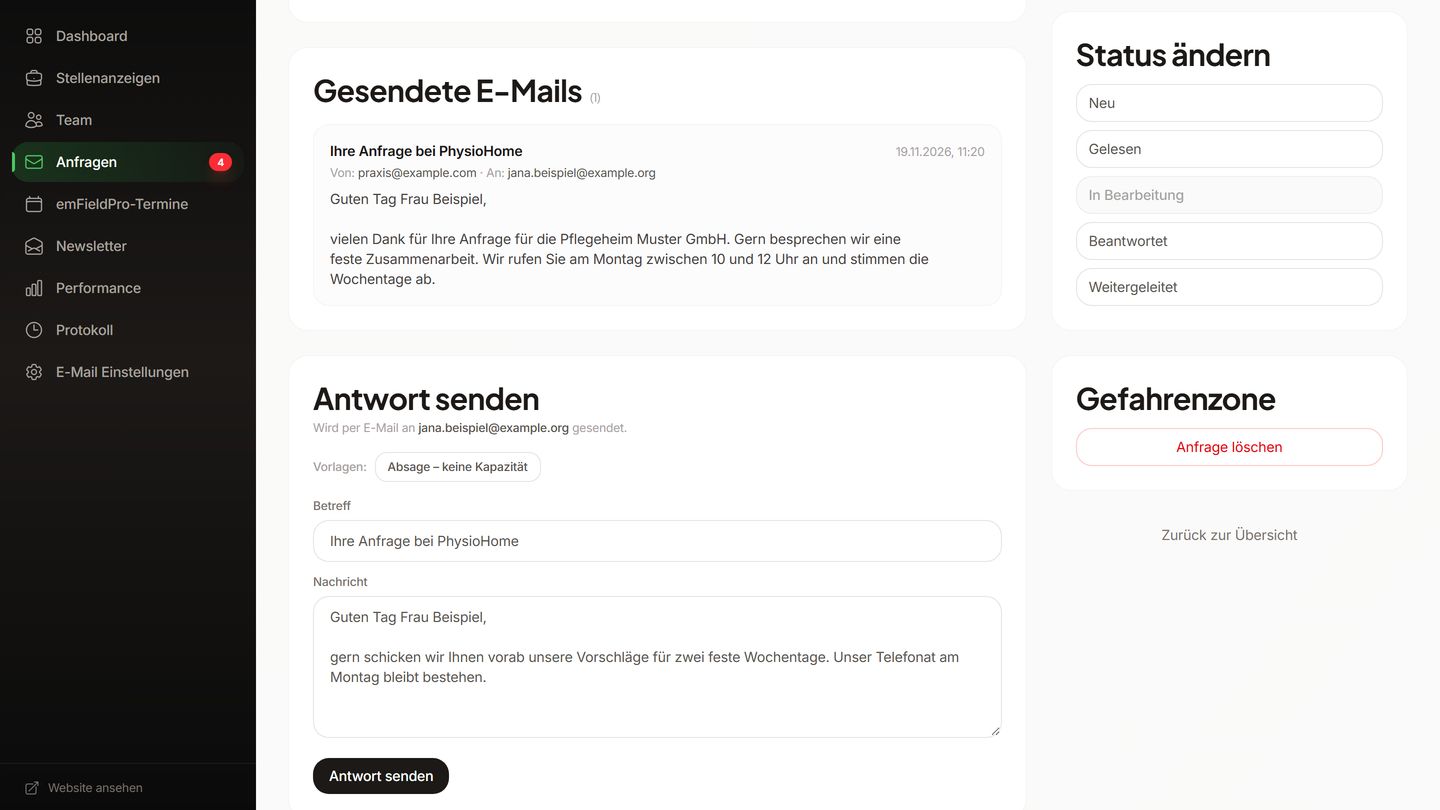
View with test data, captured on Nov 21, 2026 Online booking for emFieldPro
emFieldPro appointments can be booked online in three steps, only in slots the practice has opened; a unique key per slot rules out double bookings.
At most four online slots a day, closed on public holidays in North Rhine-Westphalia
Online booking · Choosing a day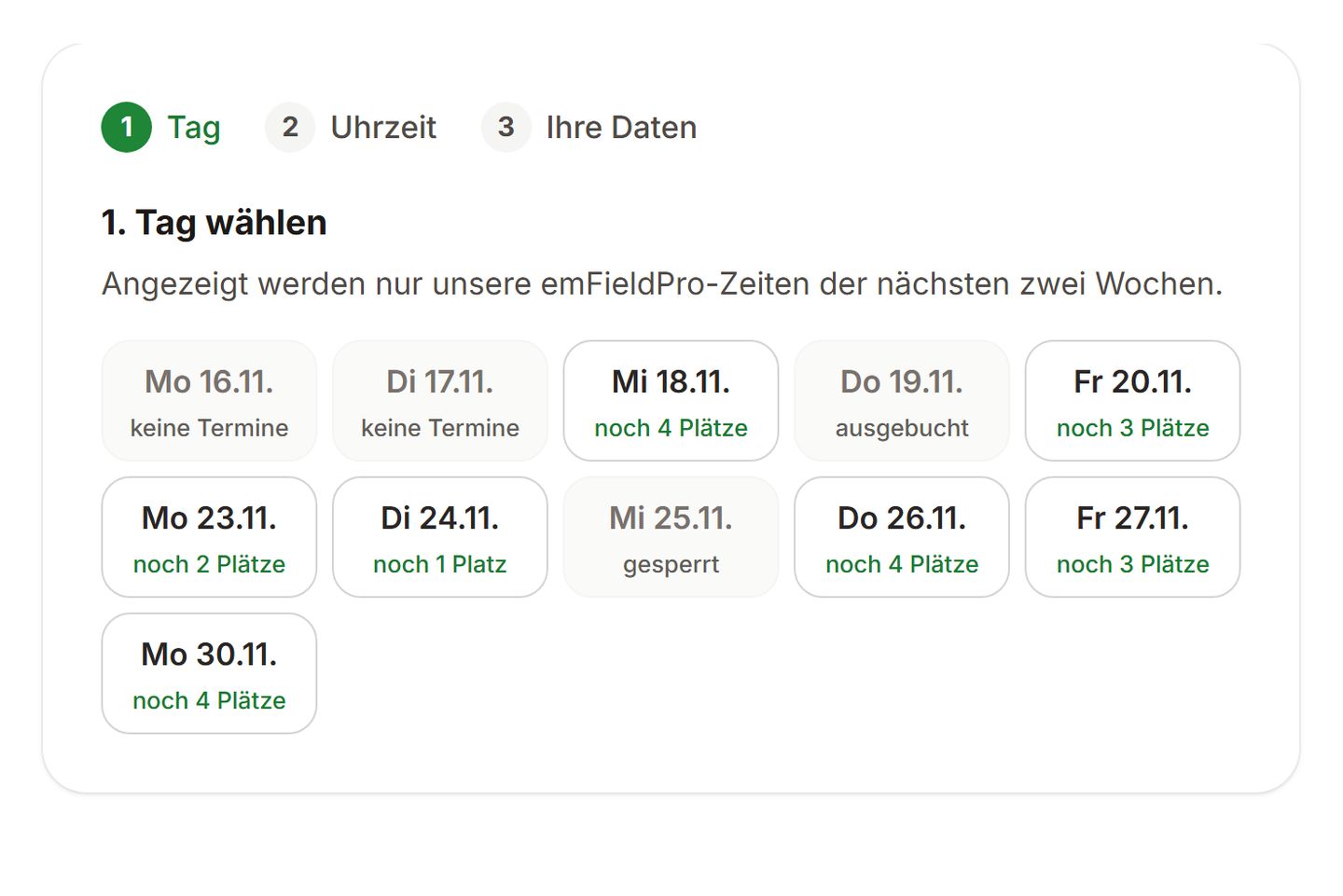
- Booking takes three steps: day, time and your details, followed by a confirmation with date and time.
- Only open 20-minute slots can be booked, at least 48 hours and at most 14 days ahead.
- Remaining slots and “ausgebucht” (fully booked) come only from confirmed bookings and blocked times; there’s no artificial scarcity.
- Blocked times close whole days or single slots, for example for time off or appointments booked by phone.
Time and details
On the chosen day, step 2 lists only the free 20-minute slots; step 3 asks for a name and email, which browser and server check against one schema.
Open slots reload if a time is taken mid-form; a cap on open bookings per email address
Online booking · Choosing a time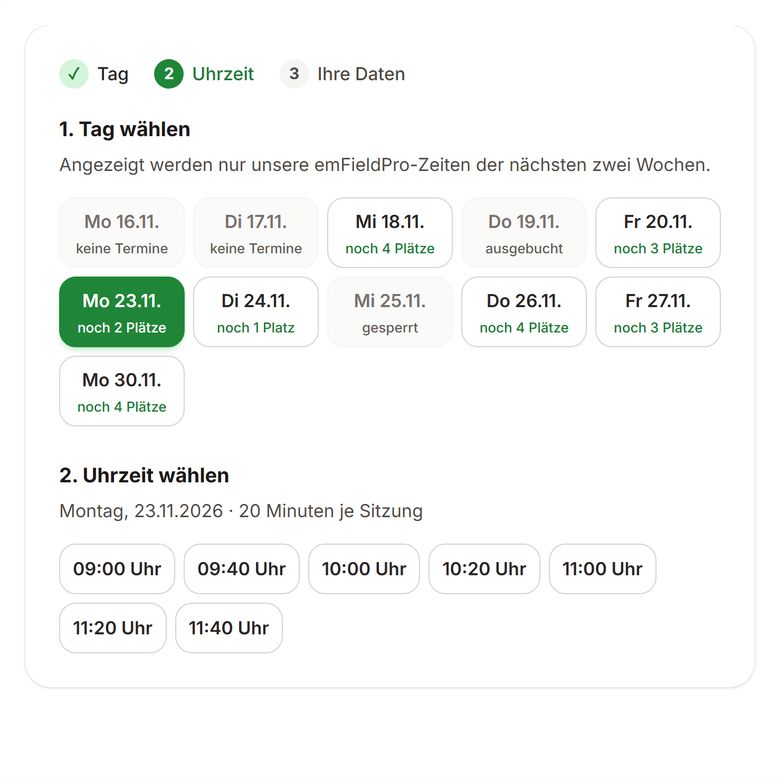
View with test data, captured on Nov 16, 2026 Online booking · Details on a smartphone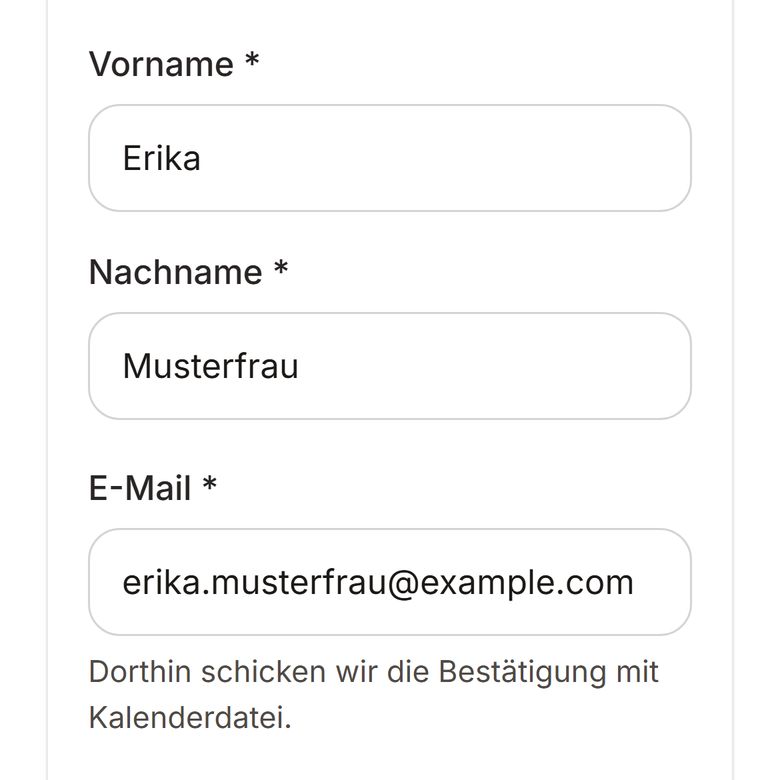
View with test data, captured on Nov 16, 2026 Confirmation and cancellation
The page confirms date and time, a confirmation with a calendar file follows by email, and the practice gets a notice with a cancellation link.
Self-cancellation via a personal link up to 48 hours ahead, cancellations and blocked times in the admin area
Online booking · Confirmation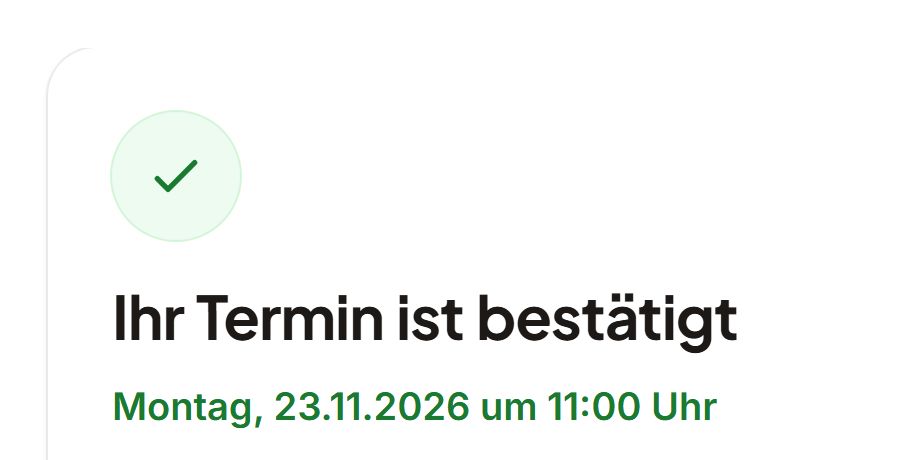
View with test data, captured on Nov 16, 2026 Job ads and activity log
Job ads can be maintained in the admin area, and each active job gets a careers page; the activity log records sign-ins and changes with their time.
Requirements and benefits as lists, structured data for job postings, newsletter with unsubscribe
Admin area · Editing a job ad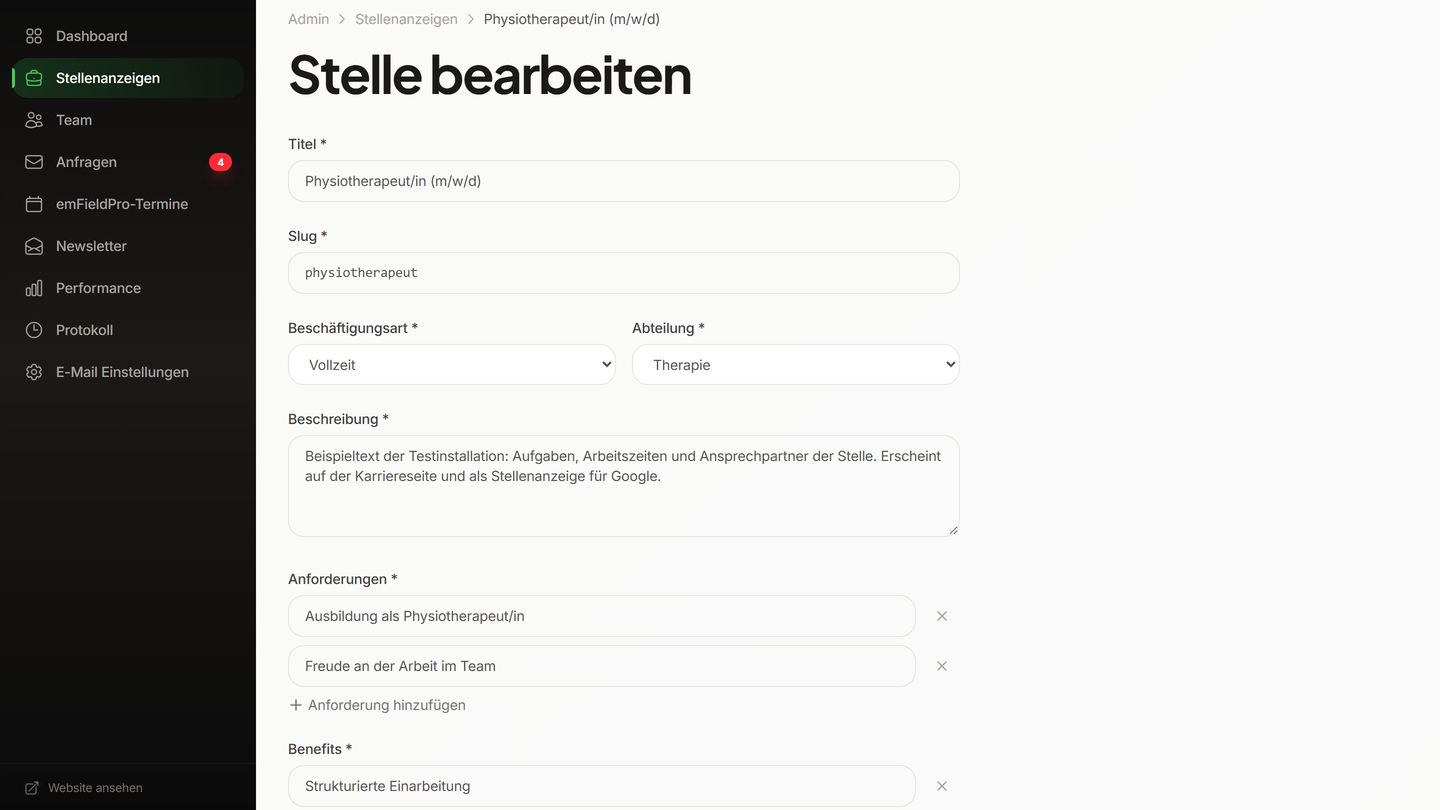
View with test data, captured on Nov 21, 2026 Admin area · Activity log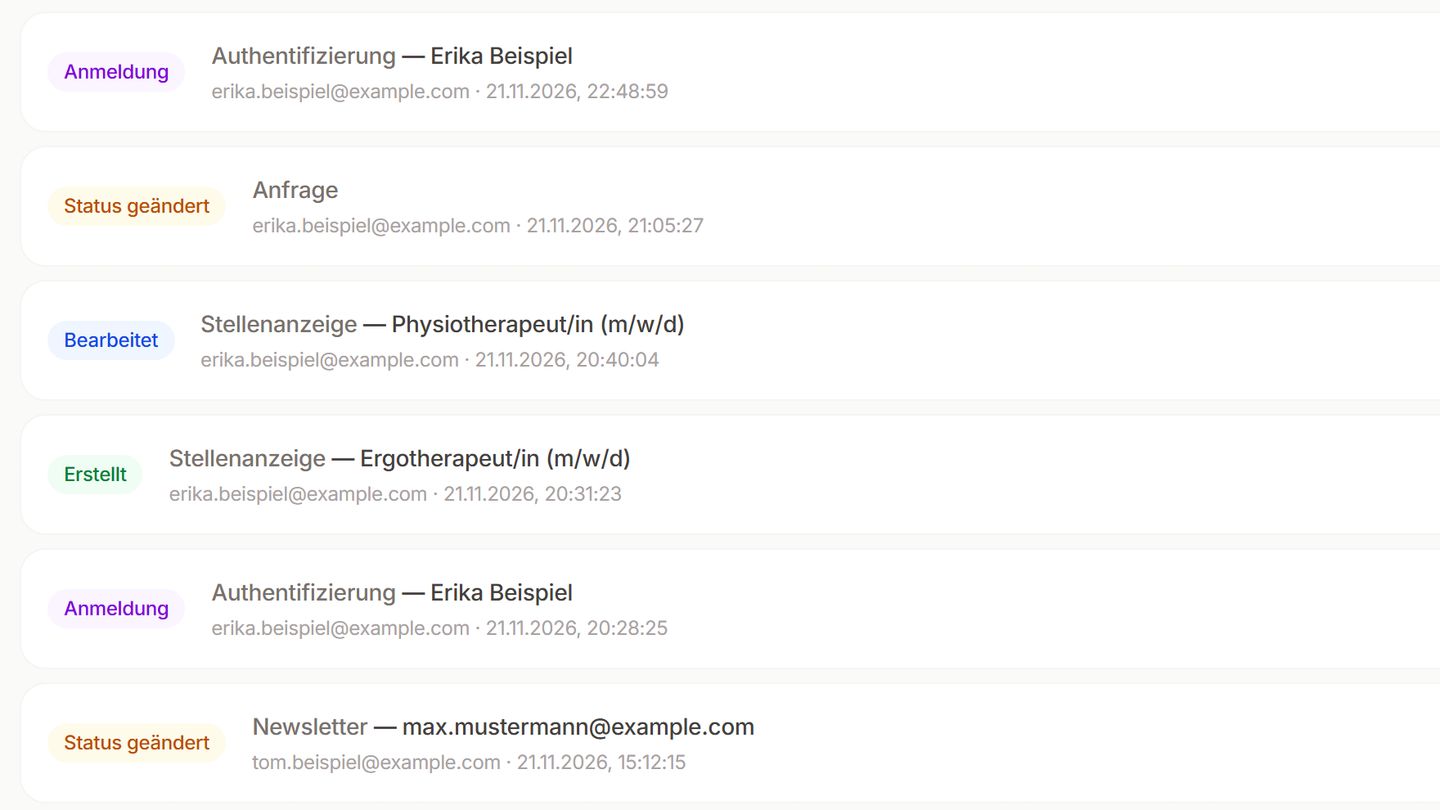
View with test data, captured on Nov 21, 2026
How do the parts fit together?
The website, online booking and admin area are one Next.js application with a single PostgreSQL database. Forms and booking save to it through the same API, and the admin area works with the same data after sign-in. The system sends emails for requests and bookings.
- Website: Services and places
- Request forms with spam filter
- Online booking for emFieldPro
- Admin area: Requests, bookings
- API: 31 API routes
- PostgreSQL: no double bookings
- Email delivery with calendar file
Decisions
- One application, one database The website, booking and admin area share code and data, so a request appears in the admin area as soon as it is saved.
- Booking in one transaction A unique key per slot and a transaction that retries on conflicts prevent double bookings; if a time is taken mid-form, the form reloads the open slots.
- Spam protection without a CAPTCHA A hidden field, a content filter and rate limits keep spam out of every form without asking anyone to click through images.
- Private data only from the network The site’s offline storage never keeps admin or appointment data on the device.
What was the starting point?
People look for a practice with home visits both where it is based and in every place it visits. PhysioHome provides physiotherapy and occupational therapy at its practice in Gelsenkirchen-Erle and as home visits across Gelsenkirchen and Gladbeck.
The website serves several audiences: people with a doctor’s prescription, relatives requesting a home visit for an older family member, care homes and job applicants. Each group needs its own way in, and no request should slip through the cracks.
The new site replaced a WordPress website. The brief covered concept, design and development, preparation for search engines and AI assistants, and an admin area for requests, bookings, job ads, team profiles and the newsletter.
How is the system built and tested?
The website, booking and admin area are one Next.js application built with React and TypeScript; the data sits in PostgreSQL, and the application runs on Railway. Automated tests cover booking logic, forms, sitemaps and redirects, among other things, and one test blocks review markup in the code.
Layers
- User interfaces
- Website: Next.js, server-rendered pages
- Online booking in three steps
- Admin area with sign-in
- Core
- API with a shared validation schema
- Sign-in with hashed passwords
- Activity log
- Data
- PostgreSQL with transactions
- Operations
- Railway
- Offline page, private pages network-only
Properties
- Booking
- three steps, 20-minute slots, at least 48 hours and at most 14 days ahead
- Double bookings
- ruled out by a unique key per slot and a transaction
- Requests
- five statuses, replies from the system, CSV export
- Spam protection
- hidden field, content filter and rate limits on every form, no CAPTCHA
- Activity log
- sign-ins and changes with time and account
- Security headers
- HSTS with preload, framing protection, referrer and permissions policies
- Machine-readable
- structured data, llms.txt, llms-full.txt, Markdown versions
Quality
- Automated tests for booking logic, forms, sitemaps, redirects and metadata, component tests for the forms and a test against review markup.
- Sign-in with hashed passwords and a lockout after failed attempts; pages and API routes of the admin area check the session.
- The booking is built so that no personal data ends up in the server logs.
What can be verified?
The service, district and home-visit pages are live, and online booking for emFieldPro is publicly available. Requests and bookings come together in the admin area, which also handles job ads and team profiles.
On November 22, 2026, we checked that physiohome.eu names Datafalke as its developer on its “Über diese Website” (about this website) page and in its humans.txt file. We will publish search and AI-answer figures only with a baseline, a period and a source.
How is physiohome.eu structured?
On November 22, 2026, the sitemap of physiohome.eu listed 600 pages. They include pages for 22 types of therapy, pages on conditions, a guide section, and place and home-visit pages for Gelsenkirchen, Gladbeck and nearby towns.
All 18 districts of Gelsenkirchen have a page, with Schalke and Schalke-Nord sharing one. Old addresses from the former WordPress site redirect in a single hop, and the booking page describes the service in structured data with a reservation action.

What else did Datafalke build?
Besides the website, booking and admin area, Datafalke built three internal systems for Therapiezentrum PhysioHome: practice management software for deadlines, repeat prescriptions and staff, HeilmittelFinder for searching the national diagnosis list for therapy prescriptions, and a timesheet generator. All screens show invented test data from a local installation.
- tRPC procedures
- 112
- data models
- 22
- test cases in the code
- 582
- screens
- 26
Counted in the source code of the practice software on November 23, 2026, code as of April 19, 2026.
Repeat prescriptions by urgency
For each open home-visit prescription, the software estimates when treatment ends and shows the reorder deadline in red, orange, yellow or green.
Requests per doctor’s practice as a PDF, by email or by fax; the prescription is then marked “Bestellt” (ordered)
Flow shown with test data; steps based on the source code, as of Apr 19, 2026. Red means the order-by date is reached, orange seven days or less to go, yellow 14 days or less, green more time or already ordered. Deadlines for every prescription
For every prescription, the software works out when treatment must start and when the prescription expires.
Follow-ups are linked to their predecessor as a chain, plus “Bestellen bis” (order by) and a preview per frequency
Practice software · Deadlines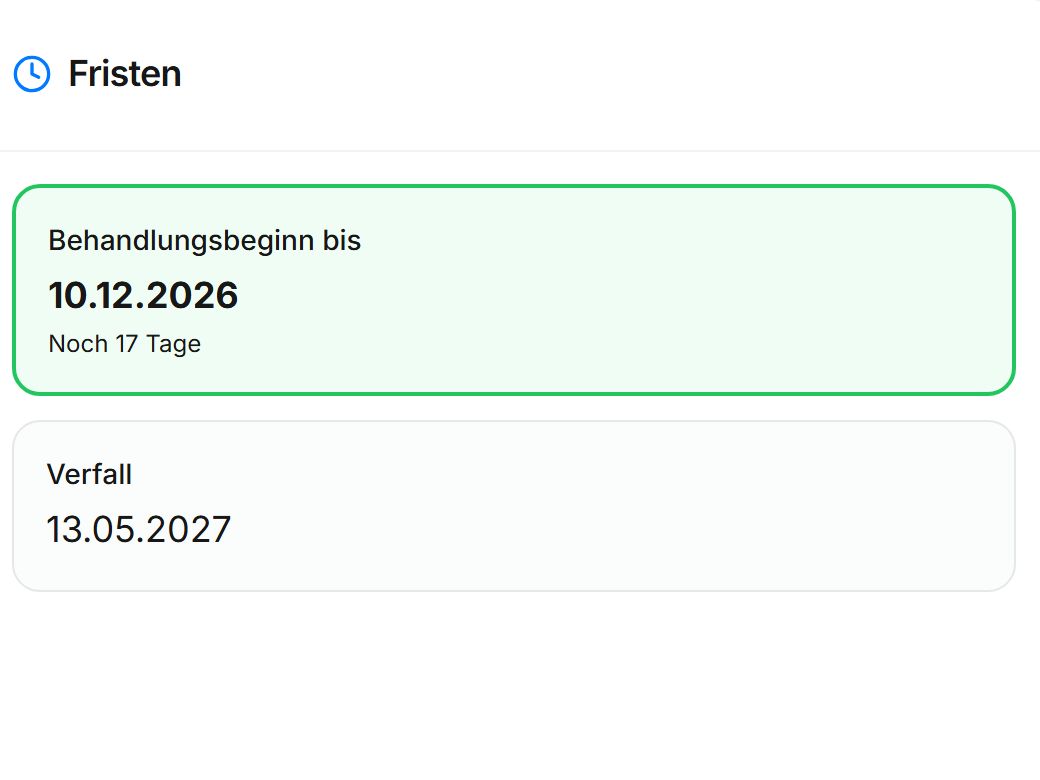
- Latest start of treatment: 28 days after the prescription date, or 14 for urgent needs, with the days left below.
- Expiry depends on the quantity and type of prescription.
Nightly sync with billing software
Server schedules pull patients and prescriptions at night and the day’s appointments each morning via the billing software’s web interface.
No run starts twice; a failed run is retried once, then flagged in the notification bell and by email
- 10 p.m.
- patients from the billing software
- 11 p.m.
- occupational therapy prescriptions
- 11:50 p.m.
- physiotherapy prescriptions
- 6 a.m.
- the day’s appointments
- By hand
- any sync can be started manually; the log records each run with its duration and result
Staff schedule and hours
The schedule shows each person’s week with work, leave, sick days, days off and training; hours add up target, actual and overtime per month.
Approved leave appears in the schedule automatically; 12 kinds of anomalies, such as a missed clock-out
Practice software · Staff schedule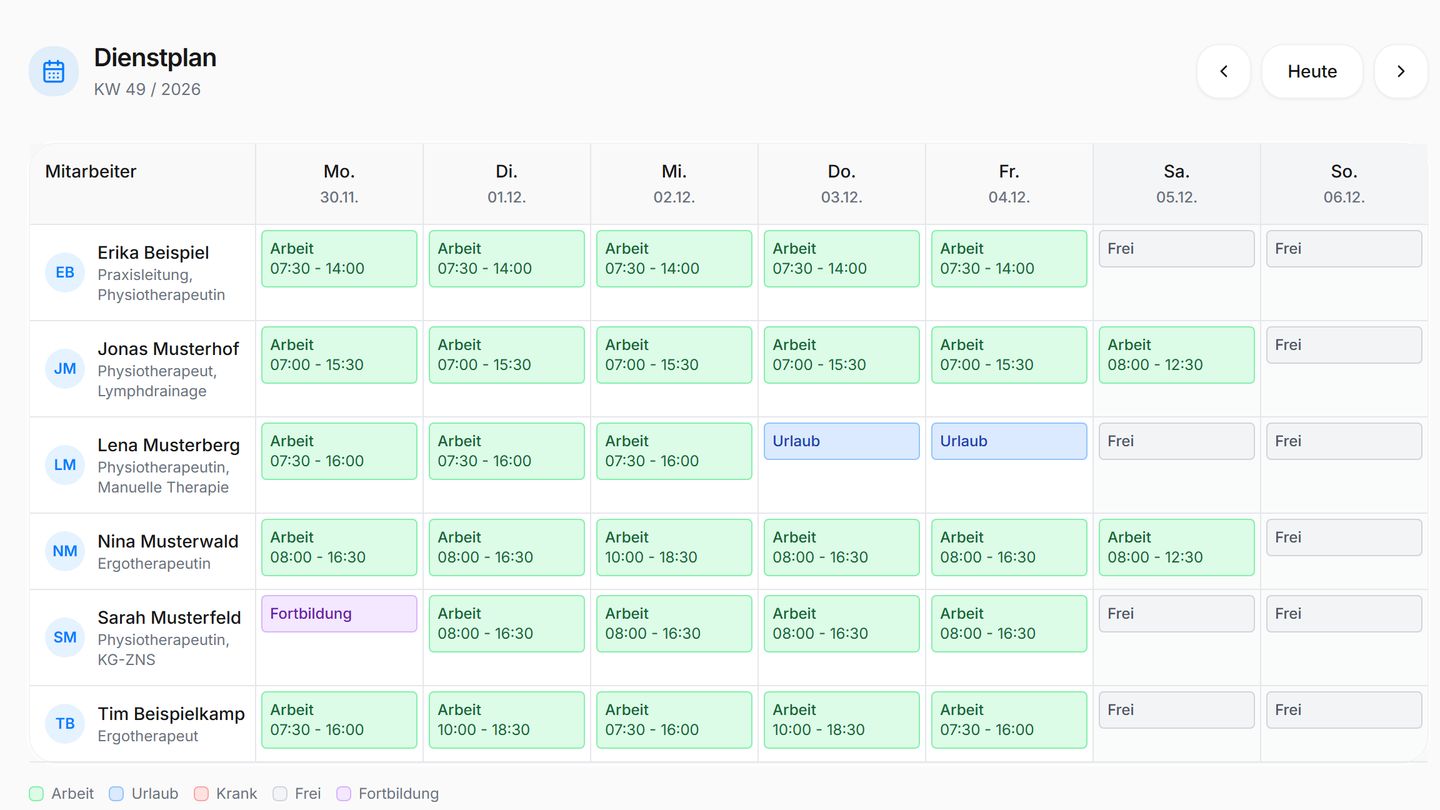
View with test data, captured on Nov 23, 2026 My day and clock-in on a smartphone
“Mein Tag” (my day) shows the day’s appointments on a phone; clocking in, out and for breaks works with the QR code of the practice or a care home.
Start screen of the practice software, with each appointment’s status and how many treatments are already documented
Practice software · My day on a smartphone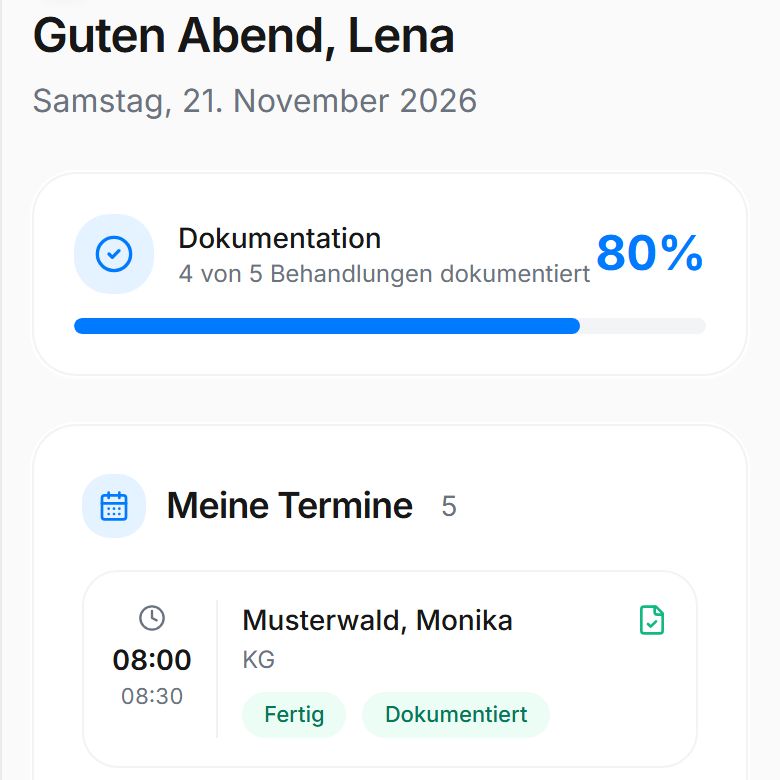
View with test data, captured on Nov 21, 2026 HeilmittelFinder for the diagnosis list
For an ICD-10 code or a diagnosis, the search shows whether it’s listed for long-term or special therapy needs or for blank prescriptions.
List by the KBV, Germany’s association of statutory health insurance physicians, as of January 1, 2026
- Data set
- 7,617 diagnoses with ICD-10 codes, plus 69 entries for blank prescriptions
- Diagnosis groups
- 13 for physiotherapy, 10 for occupational therapy
- Search
- code with or without the dot, also within code ranges on the list, or diagnosis text
- Technology
- a static page; the search runs in the browser without further requests
Timesheets in one click
A generator fills the practice’s usual Excel template with schedules, leave, sick days and holidays and returns a month of timesheets in one file.
Public holidays in North Rhine-Westphalia added automatically; formulas stay, and Excel recalculates on opening
- Input
- a weekly schedule per person with a start and end time for each weekday
- Absences
- leave (U) and sickness (K) per day in the month’s calendar
- Public holidays
- on scheduled workdays with the target hours and the code F
- Technology
- Python with Flask; writes straight into the template’s file format
How is the practice software built?
The practice software is a separate Next.js application with a tRPC API and its own data model in PostgreSQL, kept apart from the website. Server schedules pull data from the billing software, and requests go to doctors’ practices by email or fax.
- Practice software: Deadlines, shifts, team
- My day: on a smartphone
- QR clock-in: In, out and breaks
- API: 112 tRPC procedures
- Email and fax: to medical practices
- PostgreSQL: 22 data models
- Nightly sync: Server schedule
- Billing software of the practice
Decisions
- A separate application The practice software shares neither code nor data model with the website.
- Sync instead of double entry The data comes from the billing software so that nobody types it in twice; the sync drives its web interface through browser automation.
Do deadlines, staff schedules and data from other programs still come together by hand in your business? Management software of your own can take over that work.
A system like this for your business
You’ll talk to the engineer who will build your project.
Project facts
- Project
- physiohome.eu with home-visit requests, online booking and an admin area
- Client
- Therapiezentrum PhysioHome, Gelsenkirchen, Germany
- Timeframe
- First version in March 2026, continuously extended since
- Role
- Planning, design, development, SEO and GEO, admin area
- Services
- Website, search engine optimization, generative engine optimization (GEO), admin area with online booking
- Technology
- Next.js, React, TypeScript, PostgreSQL, Railway; structured data, llms.txt, Markdown versions
- Status
- Live; no published results yet for search or AI answers
Results depend on the starting point and do not transfer to every project. Published with the consent of Therapiezentrum PhysioHome.
More case studies
Editorial note
Researched and drafted with AI assistance. Mohammad Alboush has not yet checked the sources, figures and claims.
Content not yet reviewed
Changes to this report
Show all 6 changes
| Date | Type | Change |
|---|---|---|
| First publication | Version 1: website, requests, online booking and admin area, without search or AI visibility figures yet | |
| Update | Added test-data views of the online booking and a section on its features. | |
| Update | Rebuilt as a system page: added the booking flow, test-data views of the admin area, the system architecture and a technology section, and shortened the text. | |
| Update | Added figures from the source code: API routes, data models and test cases, with the code version and the counting date. | |
| Correction | Cropped the screenshots for phones so their text is legible, and adjusted the markers and image descriptions. The statements remain the same. | |
| Update | Added the practice’s system landscape: practice software with repeat prescriptions, deadlines, nightly sync, staff schedule and phone clock-in, plus HeilmittelFinder and timesheets. |
Spotted a mistake? Email us at kontakt@datafalke.de. We’ll fix it and log the change.